How to Choose a USB-C Charger for a Galaxy or Pixel Phone
Wattage alone won't get you fast charging. Here is what PPS, cable ratings and safety marks mean, and how to match a charger to your phone.
AndroidCare Editorial · Updated · 6 min read
On this page
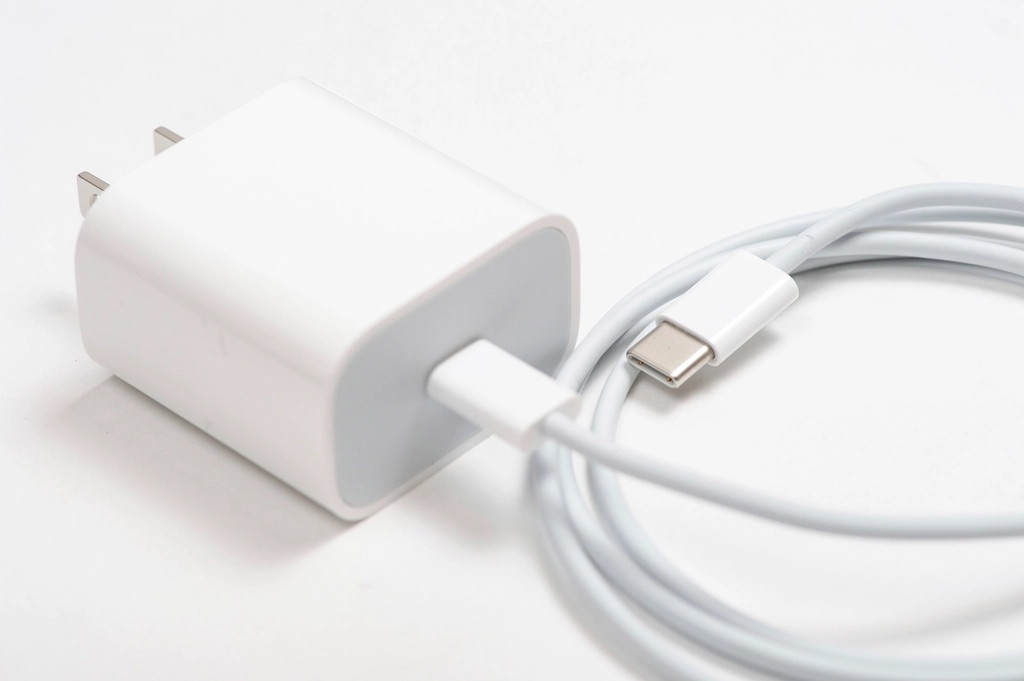
Most Samsung Galaxy and Google Pixel phones now come with a cable but no wall charger, so sooner or later you have to pick one. The listings don't make it easy: wattages from 20W to 140W, a string of abbreviations, and prices that vary several times over for products that look the same.
This guide explains the handful of specs that decide how fast and how safely your phone charges, so you can read any listing and know whether it fits. It is based on the published charging standards and on Samsung's and Google's own documentation. We have not lab-tested chargers and we don't rank products here.
The short version
For a recent Galaxy or Pixel phone, look for a charger that has all of these:
- USB-C output using USB Power Delivery (USB PD) 3.0 or later.
- PPS (Programmable Power Supply) named in the specifications.
- Wattage at or above your phone's maximum from a single port.
- A recognised safety certification mark, such as UL or ETL.
- A USB-C to USB-C cable rated for the current, which matters most at 45W and above.
The rest of this guide explains each point and the fine print that catches people out.
Step 1: Find your phone's maximum charging wattage
A phone only draws what it is designed to accept. A bigger charger is not harmful, but it is not faster either. So the first job is to find your phone's limit.
- Check the tech specs page for your exact model on samsung.com or store.google.com, under battery or charging.
- On Samsung, wired charging is sold in tiers. Depending on the model it is 25W (Super Fast Charging), 45W (Super Fast Charging 2.0), or 60W on the most recent Ultra model. Base models and foldables have typically been 25W, with Plus and Ultra models higher.
- Pixel phones charge at different peak rates by model, with the larger Pro XL models taking more than the standard ones. Google tends to state charging speed as a percentage reached in about 30 minutes with a named charger, so read the footnotes on the spec page.
Don't assume from the model name. Two phones in the same family often have different limits.
Step 2: Make sure it supports USB PD with PPS
This is the spec most people miss, and it is why a high-wattage charger can still charge a phone slowly.
USB Power Delivery is the standard that lets a charger and a device agree on a voltage and current over USB-C. Ordinary USB PD offers a few fixed voltage steps. PPS is an optional part of USB PD 3.0 that lets the phone request voltage in small increments and adjust it continuously as the battery fills. That reduces the energy wasted as heat inside the phone, which is what allows higher charging speeds.
Both brands rely on it:
- Samsung: Super Fast Charging at 25W and above uses PPS. With a USB PD charger that lacks PPS, a Galaxy phone falls back to a slower fast-charging mode.
- Pixel: Google's guidance for recent Pixel phones is to use a USB PD charger with PPS for the fastest charging.
What to check in a listing: the words "PPS" or "Programmable Power Supply" in the specifications, not only "PD" or "fast charging". Better listings print the PPS output range, for example "PPS: 3.3–11V ⎓ 5A". The same information is printed in small type on the charger itself. If PPS is not mentioned anywhere, assume it isn't supported. Many older laptop chargers have plenty of watts and no PPS.
Step 3: Read the wattage claim carefully
- Total versus per-port. A two-port charger sold as "65W" may deliver 65W only when one port is in use. With two devices plugged in, the power is split, for example 45W and 20W. The listing should show a table of port combinations. Check that the port you'll use for the phone still meets its maximum when the other is occupied, if that's how you plan to use it.
- PPS wattage can be lower than the headline. A charger can be rated 65W for laptops over fixed voltages while its PPS range tops out lower. For a 45W phone, the PPS line needs to cover 45W.
- Buying above your phone's limit is fine. A higher-wattage charger with PPS will charge your phone at the phone's own maximum, and can also run a tablet or laptop.
Keep expectations realistic too. A phone only draws its peak wattage for part of the charge, usually when the battery is low, and slows down as it fills. The difference between two tiers is real but often smaller in practice than the numbers suggest.
Step 4: Get the cable right
The cable is part of the system, and the wrong one silently limits the speed.
- Use USB-C to USB-C. A USB-A to USB-C cable cannot carry USB PD, so it won't fast charge these phones at full speed.
- Check the current rating. Standard USB-C cables carry up to 3A. Higher power needs a 5A cable, which contains an identification chip (an "e-marker") that tells the charger it can safely carry the extra current. Samsung's 45W charging requires a 5A cable; with a 3A cable the phone charges at a lower rate.
- The cable in the box is matched to the phone it came with, so it's the safe default.
- Longer and thinner cables lose more power. For charging, 3 to 6 feet from a known brand is a sensible choice.
Cable listings should state "5A" or a power rating such as "100W" or "240W". A cable described only as "fast charging" tells you nothing.
Step 5: Check safety and build
A charger converts wall power to low voltage a few inches from your phone, often overnight. This is not the place to buy the cheapest unbranded option.
- Certification mark: look for a mark from a nationally recognised testing laboratory, such as UL or ETL, on the product and in the listing. It means the design was tested against US electrical safety standards.
- A named manufacturer with a website, a warranty and a way to contact support.
- GaN (gallium nitride) chargers use newer components that waste less energy, which lets them be smaller for the same wattage. It's a size benefit, not a speed one.
- Folding prongs make a charger easier to pack. Most USB-C chargers accept 100–240V, so abroad they need only a plug adapter; confirm the input range printed on the charger.
Be wary of listings with implausible wattage for the size and price, no certification mark, or specifications that contradict each other.
Car chargers, power banks and wireless pads
The same rules apply in a car or a power bank: USB-C output, USB PD with PPS, and enough watts from a single port. Many older car chargers are USB-A only and will charge slowly.
Wireless charging is slower and produces more heat than wired, but it's convenient.
- Qi is the long-standing standard and works with nearly every phone that supports wireless charging.
- Qi2 adds magnets that snap the phone into alignment, which reduces wasted energy. Some phones have the magnets built in. Others are sold as "Qi2 Ready" and need a magnetic case to attach.
- Wireless pads often ship without a wall adapter, and a weak adapter limits the pad. Check what the pad requires.
Mistakes to avoid
| Mistake | What happens | What to do instead |
|---|---|---|
| Buying on wattage alone | Phone charges at a slower fallback rate | Confirm PPS is listed |
| Reusing an old USB-A cable or brick | No USB PD, slow charging | Use USB-C to USB-C |
| 3A cable with a 45W or 60W phone | Speed capped below the phone's maximum | Use a 5A-rated cable |
| Counting a multi-port total | Less power per port when sharing | Check the per-port table |
| No-name charger with no safety mark | Unknown electrical safety | Look for UL or ETL marks |
If your phone charges slowly even with the right charger and cable, the cause may be a setting or a dirty port. Our guide to an Android phone that won't charge covers those, and the overheating guide explains why a hot phone slows its own charging.
Sources
- Samsung US: Charge your Galaxy Z Fold7, Z Flip7, or Z Flip7 FE (fast charging settings and cable guidance)
- Google: Get the most life from your Pixel phone battery (Pixel charging and battery settings)
- USB Implementers Forum: USB Charger (USB Power Delivery) (USB PD and Programmable Power Supply)
- Wireless Power Consortium: Qi wireless charging (Qi and Qi2)
Related guides

How to Free Up Storage on Android Without Losing Photos
Empty the trash folders, clear caches and remove downloads first. Then move backed-up photos off the phone, in that order.
Do You Need Antivirus on Android? What Protects You
Android already scans your apps. Check these built-in settings first, then decide whether a security app adds anything for you.

Android Phone Overheating? Causes and Safe Ways to Cool It
Warm is normal during charging, gaming and navigation. Here is how to cool a hot phone safely, find the cause and spot a real fault.